Error:
MX Records conflict with Windows Azure website host
MX Records conflict with azurewebsites.net
Mail server not working with azurewebsites.net
Azure Websites not work with MX records
Windows Azure CNAME causes email problems
Windows Azure CNAME causes email server ignore mail forwarding
Test:
Just use of this command for find out problem. If your answer is so like to below result your MX records are correct.
Command:
nslookup -q=mx domain.com
Correct Result:
domain.com MX preference = 10, mail exchanger = blah-blah.com
But in my case after set a website host from azurewebsites.net MX records gone, because CNAME record affects the other records
Solution:
Remove CNAME records after set custom domain in Windows Azure panel and just use of A record


February 22, 2015
The prefix attribute on head for Open Graph is missing
Error:
The 'prefix' attribute on <head> for Open Graph is missing

Solution:
Just add this prefix to your head element
<head prefix="og: http://ogp.me/ns#">
The 'prefix' attribute on <head> for Open Graph is missing

Just add this prefix to your head element
<head prefix="og: http://ogp.me/ns#">
December 29, 2014
IDENTITY_INSERT is set to OFF
Error:
Cannot insert explicit value for identity column in table 'XYZ' when IDENTITY_INSERT is set to OFF.

Solution:
If you work on ASP .Net vNext with MVC 6.0 and EF 7.0 beta, welcome to hell :-))
It's was kidding.
Solution 1 is add [DatabaseGenerated(DatabaseGeneratedOption.None)] annotation to your ID of your Table (class model)
Solution 2 is add below line to OnModelCreating override method of your DbContext
builder.Entity<XYZ>().Property(i => i.Id).GenerateValuesOnAdd(generateValues: false);
Cannot insert explicit value for identity column in table 'XYZ' when IDENTITY_INSERT is set to OFF.

Solution:
If you work on ASP .Net vNext with MVC 6.0 and EF 7.0 beta, welcome to hell :-))
It's was kidding.
Solution 1 is add [DatabaseGenerated(DatabaseGeneratedOption.None)] annotation to your ID of your Table (class model)
Solution 2 is add below line to OnModelCreating override method of your DbContext
builder.Entity<XYZ>().Property(i => i.Id).GenerateValuesOnAdd(generateValues: false);
December 23, 2014
No service for type
Error:
An unhandled exception occurred while processing the request.
Exception: TODO: No service for type 'ABC.Services.XYZService' has been registered.
Microsoft.Framework.DependencyInjection.ServiceProviderExtensions.GetRequiredService(IServiceProvider provider, Type serviceType)
Solution:
If you have a new Service in your ASP .Net vNext, you need to add below line in ConfigureServices(IServiceCollection services) function in Startup.cs for register it ;-)
services.AddTransient<XYZService>();
PS: At this time ASP .Net vNext, Visual Studio 2015 and MVC 6.0 are beta version.
An unhandled exception occurred while processing the request.
Exception: TODO: No service for type 'ABC.Services.XYZService' has been registered.
Microsoft.Framework.DependencyInjection.ServiceProviderExtensions.GetRequiredService(IServiceProvider provider, Type serviceType)
Solution:
If you have a new Service in your ASP .Net vNext, you need to add below line in ConfigureServices(IServiceCollection services) function in Startup.cs for register it ;-)
services.AddTransient<XYZService>();
PS: At this time ASP .Net vNext, Visual Studio 2015 and MVC 6.0 are beta version.
Update 1: it could be solved with this services.AddScoped<XYZService>();
November 09, 2014
Problem with webopt for Scripts
Quistions:
- BundleReference for ASP .Net Forms
- System.Web.Optimization.Scripts.Render for ASP .Net Forms
- Render script without bundlereference
- Microsoft.AspNet.Web.Optimization.WebForms for Render Scripts
- @Scripts.Render for Web Forms
- Render ScriptBundle for Web Forms
Solution:
<%: System.Web.Optimization.Styles.Render("~/bundles/css") %>
<%: System.Web.Optimization.Scripts.Render("~/bundles/js") %>
- BundleReference for ASP .Net Forms
- System.Web.Optimization.Scripts.Render for ASP .Net Forms
- Render script without bundlereference
- Microsoft.AspNet.Web.Optimization.WebForms for Render Scripts
- @Scripts.Render for Web Forms
- Render ScriptBundle for Web Forms
Solution:
<%: System.Web.Optimization.Styles.Render("~/bundles/css") %>
<%: System.Web.Optimization.Scripts.Render("~/bundles/js") %>
August 26, 2014
Microsoft.Jet.OLEDB.4.0 provider is not registered
Error:
The 'Microsoft.Jet.OLEDB.4.0' provider is not registered on the local machine.
Resolution:
There is no chance to use of Microsoft.Jet.OLEDB.4.0 and Microsoft Access Files like mdb file on 64bit Windows
Solution 1:
Right Click on Project > Properties > Build > Change Platform Target to x86 and recompile it again
Solution 2:
Go to App.config and change ConnectionString from Provider=Microsoft.Jet.OLEDB.4.0 to Provider=Microsoft.ACE.OLEDB.12.0
The 'Microsoft.Jet.OLEDB.4.0' provider is not registered on the local machine.
Resolution:
There is no chance to use of Microsoft.Jet.OLEDB.4.0 and Microsoft Access Files like mdb file on 64bit Windows
Solution 1:
Right Click on Project > Properties > Build > Change Platform Target to x86 and recompile it again
Solution 2:
Go to App.config and change ConnectionString from Provider=Microsoft.Jet.OLEDB.4.0 to Provider=Microsoft.ACE.OLEDB.12.0
August 22, 2014
The service cannot be activated
Error:
The service cannot be activated because it does not support ASP.NET compatibility. ASP.NET compatibility is enabled for this application. Turn off ASP.NET compatibility mode in the web.config or add the AspNetCompatibilityRequirements attribute to the service type with RequirementsMode setting as 'Allowed' or 'Required'.
Solution:
Add this line in top your Service class
[AspNetCompatibilityRequirements(RequirementsMode = AspNetCompatibilityRequirementsMode.Allowed)]
The service cannot be activated because it does not support ASP.NET compatibility. ASP.NET compatibility is enabled for this application. Turn off ASP.NET compatibility mode in the web.config or add the AspNetCompatibilityRequirements attribute to the service type with RequirementsMode setting as 'Allowed' or 'Required'.
Solution:
Add this line in top your Service class
[AspNetCompatibilityRequirements(RequirementsMode = AspNetCompatibilityRequirementsMode.Allowed)]
July 14, 2014
Following errors were detected during this operation
Error:
ERROR DETAILS
Following errors were detected during this operation.
* [7/13/2014 10:25:54 AM] System.ArgumentException
- Value does not fall within the expected range.
- Source: System.Deployment
- Stack trace:
at System.Deployment.Internal.Isolation.IStore.LockApplicationPath(UInt32 Flags, IDefinitionAppId ApId, IntPtr& Cookie)
...
Solution:
1- Uninstall or Remove old version of application
2- Clean this path of any files and folders
PATH: %HOMEPATH%\Local Settings\Apps\2.0\
AKA: C:\Users\XYZ\AppData\Local\Apps\2.0
ERROR DETAILS
Following errors were detected during this operation.
* [7/13/2014 10:25:54 AM] System.ArgumentException
- Value does not fall within the expected range.
- Source: System.Deployment
- Stack trace:
at System.Deployment.Internal.Isolation.IStore.LockApplicationPath(UInt32 Flags, IDefinitionAppId ApId, IntPtr& Cookie)
...
Solution:
1- Uninstall or Remove old version of application
2- Clean this path of any files and folders
PATH: %HOMEPATH%\Local Settings\Apps\2.0\
AKA: C:\Users\XYZ\AppData\Local\Apps\2.0
July 13, 2014
Downloading .config did not succeed
Error:
PLATFORM VERSION INFO
Windows : 6.2.9200.0 (Win32NT)
Common Language Runtime : 4.0.30319.34003
System.Deployment.dll : 4.0.30319.33440 built by: FX45W81RTMREL
clr.dll : 4.0.30319.34003 built by: FX45W81RTMGDR
dfdll.dll : 4.0.30319.33440 built by: FX45W81RTMREL
dfshim.dll : 6.3.9600.16384 (winblue_rtm.130821-1623)
SOURCES
Deployment url : http://xyz.com/download/xyz.application
Server : Microsoft-IIS/7.5
X-Powered-By : ASP.NET
Deployment Provider url : http://xyz.com/download/xyz.application
Application url : http://xyz.com/download/Application%20Files/xyz_2_3_1_0/xyz.exe.manifest
Server : Microsoft-IIS/7.5
X-Powered-By : ASP.NET
IDENTITIES
Deployment Identity : xyz.application, Version=2.3.1.0, Culture=neutral, PublicKeyToken=91eae35baf867b49, processorArchitecture=msil
Application Identity : xyz.exe, Version=2.3.1.0, Culture=neutral, PublicKeyToken=91eae35baf867b49, processorArchitecture=msil, type=win32
APPLICATION SUMMARY
* Installable application.
ERROR SUMMARY
Below is a summary of the errors, details of these errors are listed later in the log.
* Activation of http://xyz.com/download/xyz.application resulted in exception. Following failure messages were detected:
+ Downloading http://xyz.com/download/Application Files/xyz_2_3_1_0/xyz.exe.config did not succeed.
+ The remote server returned an error: (404) Not Found.
COMPONENT STORE TRANSACTION FAILURE SUMMARY
No transaction error was detected.
WARNINGS
There were no warnings during this operation.
OPERATION PROGRESS STATUS
* [7/13/2014 11:00:18 AM] : Activation of http://xyz.com/download/xyz.application has started.
* [7/13/2014 11:00:21 AM] : Processing of deployment manifest has successfully completed.
* [7/13/2014 11:00:21 AM] : Installation of the application has started.
* [7/13/2014 11:00:32 AM] : Processing of application manifest has successfully completed.
* [7/13/2014 11:00:49 AM] : Found compatible runtime version 4.0.30319.
* [7/13/2014 11:00:49 AM] : Request of trust and detection of platform is complete.
ERROR DETAILS
Following errors were detected during this operation.
* [7/13/2014 11:01:26 AM] System.Deployment.Application.DeploymentDownloadException (Unknown subtype)
- Downloading http://xyz.com/download/Application Files/xyz_2_3_1_0/xyz.exe.config did not succeed.
- Source: System.Deployment
- Stack trace:
at System.Deployment.Application.SystemNetDownloader.DownloadSingleFile(DownloadQueueItem next)
at System.Deployment.Application.SystemNetDownloader.DownloadAllFiles()
at System.Deployment.Application.FileDownloader.Download(SubscriptionState subState)
at System.Deployment.Application.DownloadManager.DownloadDependencies(SubscriptionState subState, AssemblyManifest deployManifest, AssemblyManifest appManifest, Uri sourceUriBase, String targetDirectory, String group, IDownloadNotification notification, DownloadOptions options)
at System.Deployment.Application.ApplicationActivator.DownloadApplication(SubscriptionState subState, ActivationDescription actDesc, Int64 transactionId, TempDirectory& downloadTemp)
at System.Deployment.Application.ApplicationActivator.InstallApplication(SubscriptionState& subState, ActivationDescription actDesc)
at System.Deployment.Application.ApplicationActivator.PerformDeploymentActivation(Uri activationUri, Boolean isShortcut, String textualSubId, String deploymentProviderUrlFromExtension, BrowserSettings browserSettings, String& errorPageUrl)
at System.Deployment.Application.ApplicationActivator.ActivateDeploymentWorker(Object state)
--- Inner Exception ---
System.Net.WebException
- The remote server returned an error: (404) Not Found.
- Source: System
- Stack trace:
at System.Net.HttpWebRequest.GetResponse()
at System.Deployment.Application.SystemNetDownloader.DownloadSingleFile(DownloadQueueItem next)
COMPONENT STORE TRANSACTION DETAILS
No transaction information is available.

- Downloading blah/blah/xyz.exe.config did not succeed
- Downloading .config did not succeed
Windows : 6.2.9200.0 (Win32NT)
Common Language Runtime : 4.0.30319.34003
System.Deployment.dll : 4.0.30319.33440 built by: FX45W81RTMREL
clr.dll : 4.0.30319.34003 built by: FX45W81RTMGDR
dfdll.dll : 4.0.30319.33440 built by: FX45W81RTMREL
dfshim.dll : 6.3.9600.16384 (winblue_rtm.130821-1623)
SOURCES
Deployment url : http://xyz.com/download/xyz.application
Server : Microsoft-IIS/7.5
X-Powered-By : ASP.NET
Deployment Provider url : http://xyz.com/download/xyz.application
Application url : http://xyz.com/download/Application%20Files/xyz_2_3_1_0/xyz.exe.manifest
Server : Microsoft-IIS/7.5
X-Powered-By : ASP.NET
IDENTITIES
Deployment Identity : xyz.application, Version=2.3.1.0, Culture=neutral, PublicKeyToken=91eae35baf867b49, processorArchitecture=msil
Application Identity : xyz.exe, Version=2.3.1.0, Culture=neutral, PublicKeyToken=91eae35baf867b49, processorArchitecture=msil, type=win32
APPLICATION SUMMARY
* Installable application.
ERROR SUMMARY
Below is a summary of the errors, details of these errors are listed later in the log.
* Activation of http://xyz.com/download/xyz.application resulted in exception. Following failure messages were detected:
+ Downloading http://xyz.com/download/Application Files/xyz_2_3_1_0/xyz.exe.config did not succeed.
+ The remote server returned an error: (404) Not Found.
COMPONENT STORE TRANSACTION FAILURE SUMMARY
No transaction error was detected.
WARNINGS
There were no warnings during this operation.
OPERATION PROGRESS STATUS
* [7/13/2014 11:00:18 AM] : Activation of http://xyz.com/download/xyz.application has started.
* [7/13/2014 11:00:21 AM] : Processing of deployment manifest has successfully completed.
* [7/13/2014 11:00:21 AM] : Installation of the application has started.
* [7/13/2014 11:00:32 AM] : Processing of application manifest has successfully completed.
* [7/13/2014 11:00:49 AM] : Found compatible runtime version 4.0.30319.
* [7/13/2014 11:00:49 AM] : Request of trust and detection of platform is complete.
ERROR DETAILS
Following errors were detected during this operation.
* [7/13/2014 11:01:26 AM] System.Deployment.Application.DeploymentDownloadException (Unknown subtype)
- Downloading http://xyz.com/download/Application Files/xyz_2_3_1_0/xyz.exe.config did not succeed.
- Source: System.Deployment
- Stack trace:
at System.Deployment.Application.SystemNetDownloader.DownloadSingleFile(DownloadQueueItem next)
at System.Deployment.Application.SystemNetDownloader.DownloadAllFiles()
at System.Deployment.Application.FileDownloader.Download(SubscriptionState subState)
at System.Deployment.Application.DownloadManager.DownloadDependencies(SubscriptionState subState, AssemblyManifest deployManifest, AssemblyManifest appManifest, Uri sourceUriBase, String targetDirectory, String group, IDownloadNotification notification, DownloadOptions options)
at System.Deployment.Application.ApplicationActivator.DownloadApplication(SubscriptionState subState, ActivationDescription actDesc, Int64 transactionId, TempDirectory& downloadTemp)
at System.Deployment.Application.ApplicationActivator.InstallApplication(SubscriptionState& subState, ActivationDescription actDesc)
at System.Deployment.Application.ApplicationActivator.PerformDeploymentActivation(Uri activationUri, Boolean isShortcut, String textualSubId, String deploymentProviderUrlFromExtension, BrowserSettings browserSettings, String& errorPageUrl)
at System.Deployment.Application.ApplicationActivator.ActivateDeploymentWorker(Object state)
--- Inner Exception ---
System.Net.WebException
- The remote server returned an error: (404) Not Found.
- Source: System
- Stack trace:
at System.Net.HttpWebRequest.GetResponse()
at System.Deployment.Application.SystemNetDownloader.DownloadSingleFile(DownloadQueueItem next)
COMPONENT STORE TRANSACTION DETAILS
No transaction information is available.
Solution:

This error related to IIS security about .config files. you must go to your visual studio Project > Properties > Publish > Options > and checked Use '.deploy' file extension checkbox ;-)
July 05, 2014
Plesk and forward www to non-www
Problem
- How to change www site to non-www with Plesk
- How to forward www site to non-www with Plesk
- How to forward www.domain.com to domain.com
- Where's Preferred Domain in new Plesk 11.0.9
Solution for Plesk 11.5
Click on Websites & Domains > Hosting Settings > and change Preferred domain to None
Solution for Plesk 11.0.9 and Older
Add DNS Record WWW > CNAME > DOMAIN.COM.
- How to change www site to non-www with Plesk
- How to forward www site to non-www with Plesk
- How to forward www.domain.com to domain.com
- Where's Preferred Domain in new Plesk 11.0.9
Solution for Plesk 11.5
Click on Websites & Domains > Hosting Settings > and change Preferred domain to None
Solution for Plesk 11.0.9 and Older
Add DNS Record WWW > CNAME > DOMAIN.COM.
March 26, 2014
Ideas
I have more ideas for change this planet with Fascinate, Very Practical and based on technology solutions that live in my head from more years and i want to find out a solution for
- BUILD them
- TALK about them
- GROW them in a competition or contest
- REGISTER them :-( at least
but i can't find a right solution out and this is very ridiculous
Google Science Fair
https://www.googlesciencefair.com
It's open to students from 13 to 18 years old
Google Lunar XPRIZE
www.googlelunarxprize.org
I have no money for build a space shuttle and lunar robot
Qualcomm Tricorder XPRIZE
http://www.qualcommtricorderxprize.org/
This is so usefull for my health-net solution but Ooops
It has a $25,000 USD registeration fee and Registration Deadline was August 30, 2013
BIG OOPS
Nokia Sensing XCHALLENGE
http://www.nokiasensingxchallenge.org/
This could be a good place for my health-net solution
Registration Deadline is April 16, 2014 by 1000 USD
Moonbots
http://moonbots.org/
This challenge belong to youth from 9 to 17 years old
FIRST
http://www.usfirst.org/
For Inspiration and Recognition of Science and Technology
Junior FIRST LEGO League (Jr.FLL)
Age: 6~9
http://www.juniorfirstlegoleague.org/
FIRST LEGO League
Age: 9~14
http://www.firstlegoleague.org/
FIRST Tech Challenge (Grades 7-12)
Age: high-schoolers
http://www.usfirst.org/roboticsprograms/ftc
FIRST Robotics Competition (Grades 9-12)
Age: 9~14
http://www.firstlegoleague.org/
SBIR
Small Business Innovation Research
Phase I: $150k over 6 months - Feasibility Study
Phase II: $750k over 2 years - Development Project
http://www.nsf.gov/eng/iip/sbir/faq.jsp
Just for american company
PS: If you have a solution for present a very large scale solution please help me :-)
- BUILD them
- TALK about them
- GROW them in a competition or contest
- REGISTER them :-( at least
but i can't find a right solution out and this is very ridiculous
Google Science Fair
https://www.googlesciencefair.com
It's open to students from 13 to 18 years old
Google Lunar XPRIZE
www.googlelunarxprize.org
I have no money for build a space shuttle and lunar robot
Qualcomm Tricorder XPRIZE
http://www.qualcommtricorderxprize.org/
This is so usefull for my health-net solution but Ooops
It has a $25,000 USD registeration fee and Registration Deadline was August 30, 2013
BIG OOPS
Nokia Sensing XCHALLENGE
http://www.nokiasensingxchallenge.org/
This could be a good place for my health-net solution
Registration Deadline is April 16, 2014 by 1000 USD
Moonbots
http://moonbots.org/
This challenge belong to youth from 9 to 17 years old
FIRST
http://www.usfirst.org/
For Inspiration and Recognition of Science and Technology
Junior FIRST LEGO League (Jr.FLL)
Age: 6~9
http://www.juniorfirstlegoleague.org/
FIRST LEGO League
Age: 9~14
http://www.firstlegoleague.org/
Age: high-schoolers
http://www.usfirst.org/roboticsprograms/ftc
Age: 9~14
http://www.firstlegoleague.org/
SBIR
Small Business Innovation Research
Phase I: $150k over 6 months - Feasibility Study
Phase II: $750k over 2 years - Development Project
http://www.nsf.gov/eng/iip/sbir/faq.jsp
Just for american company
PS: If you have a solution for present a very large scale solution please help me :-)
March 24, 2014
Edit Google Document with Microsoft Word
Questions:
- How to edit google document with microsoft word
- How to open a MS Word Document from Google DOCS, edit it, and then save it directly back to Google Document
- How to change a document in Google Drive
- Editing and Working with Microsoft Office on Google Documents
Solution:
Add new REVISION by right click on your document in Google Drive and select Manage revisions... and select Upload new revision and upload your new version of document
- How to edit google document with microsoft word
- How to open a MS Word Document from Google DOCS, edit it, and then save it directly back to Google Document
- How to change a document in Google Drive
- Editing and Working with Microsoft Office on Google Documents
Solution:
Add new REVISION by right click on your document in Google Drive and select Manage revisions... and select Upload new revision and upload your new version of document
RoboCupRescue Robot League Research Fields
These are some research fields that we need to have to research about these for our Robocup Rescue - Rescue Robot Team.
1- People Detection
1.1- With Thermal Data
1.2- With 3D Data (from laser or kinect)
1.3- Body part detection
1.4- Vision Based Victim Detection
2D and 3D Human Pose Estimation in Single Images
Pictorial Structures Revisited
People Detection
Pedestrian Detection
People Tracking
Human 3D Pose Estimation
Articulated Pose Estimation
Discriminative Appearance Models for Pictorial Structures
Articulated Pose Estimation and Tracking
Monocular 3D pose estimation and tracking by detection
2D Articulated Human Pose Estimation
Unsupervised Image Classification
Human pose estimation for Kinect
Kinect pose estimation
Detection and recognition of unstructured human activity in unstructured environments
Human body posture detection
Object Detection Technique Development for a Disaster Area
2- The problem of simultaneous localization and mapping (SLAM)
2-1- Google Tango
- Visual SLAM (Visual Simultaneous Localization And Mapping)
- Interest Point Detectors and Local Descriptors for Visual SLAM
- Optical Navigation System
- 3D Simultaneous Mapping and Localization (SLAM) algorithms
- Monocular SLAM / MonoSLAM
- Parallel Tracking and Mapping System
- A Flexible and Scalable SLAM System with Full 3D Motion Estimation
3- Robot Localization
3-1- Inertial Measurement Unit Based Pose Estimation
3-2- RSSI-Based Localization
3-3- Vision-Based Mobile Robot Navigation (Visual Odometry)
3-4- Inertial Sensor Data Integration in Computer Vision Systems
- Robot's Global Positioning
- Robot Pose Estimation - Self Localization
- Scan Matching
- Monte Carlo Localization
- Robot pose estimation in unknown environments by matching 2d range scans
- The normal distributions transform: A new approach to laser scan matching
- A real-time algorithm for mobile robot mapping with applications to multi-robot and 3D mapping
- Monte carlo localization for mobile robots
- Monte carlo localization: Efficient position estimation for mobile robots
- Depth Camera Based Indoor Mobile Robot Localization and Navigation
- Fast Indoor Radio-Map Building for RSSI-based Localization Systems
- Autonomous Mapping and Navigation
- Robust real-time tracking by fusing measurements from inertial and vision sensors
- vision-based mobile robot navigation using image processing and cell decomposition
- Localization in Wireless Networks via Laser Scanning and Bayesian Compressed Sensing
4- Compare devices for map building, localization, collision avoidance
*LRF (Laser Range Finders)
*LIDAR (Light Detection and Ranging)
- Are laser scanners replaceable by Kinect sensors in robotic
- Compare
-- Microsoft Kinect (for Windows / for Xbox 360)
-- Microsoft Kinect for Windows v2 K4W2
-- Laser Scanner: SICK (like LMS 200)
-- LRF: Hokuyo (like URG-04LX)
-- Asus Xtion / PRO
-- Asus Xtion Live / PRO
-- PrimeSense Carmine
1- People Detection
1.1- With Thermal Data
1.2- With 3D Data (from laser or kinect)
1.3- Body part detection
1.4- Vision Based Victim Detection
2D and 3D Human Pose Estimation in Single Images
Pictorial Structures Revisited
People Detection
Pedestrian Detection
People Tracking
Human 3D Pose Estimation
Articulated Pose Estimation
Discriminative Appearance Models for Pictorial Structures
Articulated Pose Estimation and Tracking
Monocular 3D pose estimation and tracking by detection
2D Articulated Human Pose Estimation
Unsupervised Image Classification
Human pose estimation for Kinect
Kinect pose estimation
Detection and recognition of unstructured human activity in unstructured environments
Human body posture detection
Object Detection Technique Development for a Disaster Area
2- The problem of simultaneous localization and mapping (SLAM)
2-1- Google Tango
- Visual SLAM (Visual Simultaneous Localization And Mapping)
- Interest Point Detectors and Local Descriptors for Visual SLAM
- Optical Navigation System
- 3D Simultaneous Mapping and Localization (SLAM) algorithms
- Monocular SLAM / MonoSLAM
- Parallel Tracking and Mapping System
- A Flexible and Scalable SLAM System with Full 3D Motion Estimation
3- Robot Localization
3-1- Inertial Measurement Unit Based Pose Estimation
3-2- RSSI-Based Localization
3-3- Vision-Based Mobile Robot Navigation (Visual Odometry)
3-4- Inertial Sensor Data Integration in Computer Vision Systems
- Robot's Global Positioning
- Robot Pose Estimation - Self Localization
- Scan Matching
- Monte Carlo Localization
- Robot pose estimation in unknown environments by matching 2d range scans
- The normal distributions transform: A new approach to laser scan matching
- A real-time algorithm for mobile robot mapping with applications to multi-robot and 3D mapping
- Monte carlo localization for mobile robots
- Monte carlo localization: Efficient position estimation for mobile robots
- Depth Camera Based Indoor Mobile Robot Localization and Navigation
- Fast Indoor Radio-Map Building for RSSI-based Localization Systems
- Autonomous Mapping and Navigation
- Robust real-time tracking by fusing measurements from inertial and vision sensors
- vision-based mobile robot navigation using image processing and cell decomposition
- Localization in Wireless Networks via Laser Scanning and Bayesian Compressed Sensing
4- Compare devices for map building, localization, collision avoidance
*LRF (Laser Range Finders)
*LIDAR (Light Detection and Ranging)
- Are laser scanners replaceable by Kinect sensors in robotic
- Compare
-- Microsoft Kinect (for Windows / for Xbox 360)
-- Microsoft Kinect for Windows v2 K4W2
-- Laser Scanner: SICK (like LMS 200)
-- LRF: Hokuyo (like URG-04LX)
-- Asus Xtion / PRO
-- Asus Xtion Live / PRO
-- PrimeSense Carmine
March 08, 2014
OpenCV on Visual Studio 2013
Questions:
- How to start OpenCV with VC++
- How to create a new opencv project in VS2013
- How to configure Visual Studio 2013 for OpenCV
- Why i can't config windows and visual studio for start with OpenCV
Configure Windows:
Follow these steps
1- My Computer > Properties > Advanced System Settings > Environment Variables > New and add new system variable
Name: OPENCV_DIR
Value: C:\opencv\build\ (or other path that you like)
2- My Computer > Properties > Advanced System Settings > Environment Variables... > System variables > select Path and press Edit button
and add ;%OPENCV_DIR%\x86\vc12\bin
PS: for Visual Studio 2013 add ;%OPENCV_DIR%\x86\vc12\bin
PS: for Visual Studio 2012 add ;%OPENCV_DIR%\x86\vc11\bin


Configure Visual Studio Project:
1- Add new Visual C++ Project from File > Project... > Visual C++ > Win32 Console Application and select a name for your project and press OK and finished
2- Go to Solution Explorer > select Project and right click > Properties > Configuration > and select All Configurations
3- In left tree menu select Configuration Properties > C/C++ > General > Additional Include Directories > Add $(OPENCV_DIR)\Include in right section
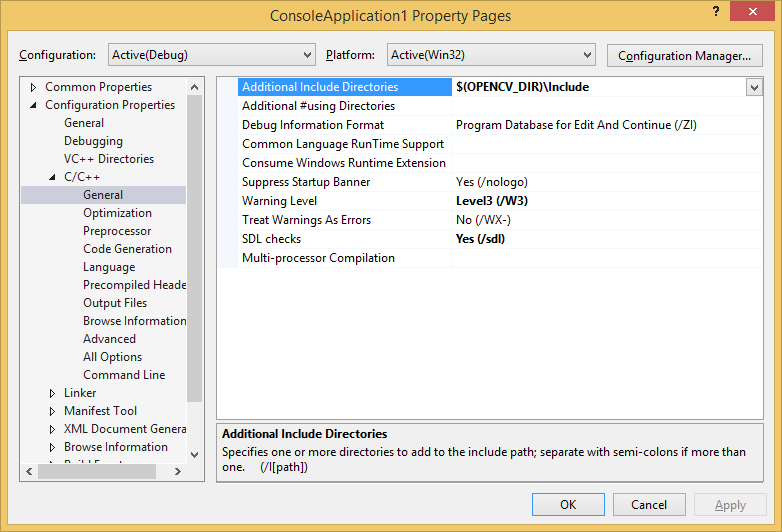
3- In left tree menu select Configuration Properties > C/C++ > Linker > General > Additional Library Directories > Add $(OPENCV_DIR)\x86\vc12\lib in right section
PS: Please choose right item based on your visual studio
$(OPENCV_DIR)\x86\vc12\lib or
$(OPENCV_DIR)\x86\vc12\lib or
$(OPENCV_DIR)\x86\vc12\lib
you can find version of visual studio in Configuration Properties > General > Platform Toolset
3- In left tree menu select Configuration Properties > C/C++ > Linker > Input > Additional Dependencies > select Edit and add below lib files
opencv_calib3d248d.lib
opencv_contrib248d.lib
opencv_core248d.lib
opencv_features2d248d.lib
opencv_flann248d.lib
opencv_gpu248d.lib
opencv_haartraining_engined.lib
opencv_highgui248d.lib
opencv_imgproc248d.lib
opencv_legacy248d.lib
opencv_ml248d.lib
opencv_nonfree248d.lib
opencv_objdetect248d.lib
opencv_photo248d.lib
opencv_stitching248d.lib
opencv_superres248d.lib
opencv_ts248d.lib
opencv_video248d.lib
opencv_videostab248d.lib
PS: Above file names are consist of opencv_ + name of library + version of OpenCV and d for Debug library edition
PS: Before add these items open
C:\opencv\build\x86\vc10\lib or
C:\opencv\build\x86\vc11\lib or
C:\opencv\build\x86\vc12\lib
based on your Visual Studio and select right names
PS: You can change Configuration in top left of Property Pages and select Release and add with 'd' Library to your release project
opencv_calib3d248.lib
opencv_contrib248.lib
opencv_core248.lib
opencv_features2d248.lib
opencv_flann248.lib
opencv_gpu248.lib
opencv_haartraining_engined.lib
opencv_highgui248.lib
opencv_imgproc248.lib
opencv_legacy248.lib
opencv_ml248.lib
opencv_nonfree248.lib
opencv_objdetect248.lib
opencv_photo248.lib
opencv_stitching248.lib
opencv_superres248.lib
opencv_ts248.lib
opencv_video248.lib
opencv_videostab248.lib
PS: all these libraries (lib files) are not required and you can choose your required library
Explanation:
- Microsoft Windows 8.1
- Visual Studio 2013 (v120)
- How to start OpenCV with VC++
- How to create a new opencv project in VS2013
- How to configure Visual Studio 2013 for OpenCV
- Why i can't config windows and visual studio for start with OpenCV
Configure Windows:
Follow these steps
1- My Computer > Properties > Advanced System Settings > Environment Variables > New and add new system variable
Name: OPENCV_DIR
Value: C:\opencv\build\ (or other path that you like)
2- My Computer > Properties > Advanced System Settings > Environment Variables... > System variables > select Path and press Edit button
and add ;%OPENCV_DIR%\x86\vc12\bin
PS: for Visual Studio 2013 add ;%OPENCV_DIR%\x86\vc12\bin
PS: for Visual Studio 2012 add ;%OPENCV_DIR%\x86\vc11\bin


Configure Visual Studio Project:
1- Add new Visual C++ Project from File > Project... > Visual C++ > Win32 Console Application and select a name for your project and press OK and finished
2- Go to Solution Explorer > select Project and right click > Properties > Configuration > and select All Configurations
3- In left tree menu select Configuration Properties > C/C++ > General > Additional Include Directories > Add $(OPENCV_DIR)\Include in right section
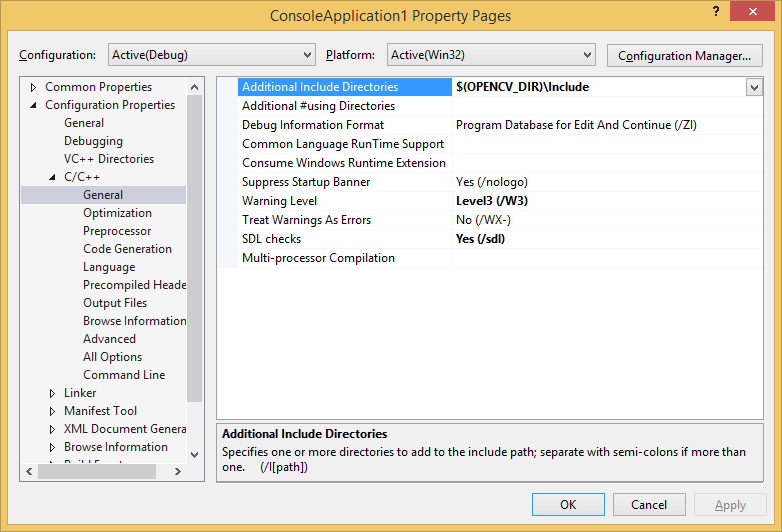
3- In left tree menu select Configuration Properties > C/C++ > Linker > General > Additional Library Directories > Add $(OPENCV_DIR)\x86\vc12\lib in right section
PS: Please choose right item based on your visual studio
$(OPENCV_DIR)\x86\vc12\lib or
$(OPENCV_DIR)\x86\vc12\lib or
$(OPENCV_DIR)\x86\vc12\lib
you can find version of visual studio in Configuration Properties > General > Platform Toolset
3- In left tree menu select Configuration Properties > C/C++ > Linker > Input > Additional Dependencies > select Edit and add below lib files
opencv_calib3d248d.lib
opencv_contrib248d.lib
opencv_core248d.lib
opencv_features2d248d.lib
opencv_flann248d.lib
opencv_gpu248d.lib
opencv_haartraining_engined.lib
opencv_highgui248d.lib
opencv_imgproc248d.lib
opencv_legacy248d.lib
opencv_ml248d.lib
opencv_nonfree248d.lib
opencv_objdetect248d.lib
opencv_photo248d.lib
opencv_stitching248d.lib
opencv_superres248d.lib
opencv_ts248d.lib
opencv_video248d.lib
opencv_videostab248d.lib
PS: Above file names are consist of opencv_ + name of library + version of OpenCV and d for Debug library edition
PS: Before add these items open
C:\opencv\build\x86\vc10\lib or
C:\opencv\build\x86\vc11\lib or
C:\opencv\build\x86\vc12\lib
based on your Visual Studio and select right names
PS: You can change Configuration in top left of Property Pages and select Release and add with 'd' Library to your release project
opencv_calib3d248.lib
opencv_contrib248.lib
opencv_core248.lib
opencv_features2d248.lib
opencv_flann248.lib
opencv_gpu248.lib
opencv_haartraining_engined.lib
opencv_highgui248.lib
opencv_imgproc248.lib
opencv_legacy248.lib
opencv_ml248.lib
opencv_nonfree248.lib
opencv_objdetect248.lib
opencv_photo248.lib
opencv_stitching248.lib
opencv_superres248.lib
opencv_ts248.lib
opencv_video248.lib
opencv_videostab248.lib
PS: all these libraries (lib files) are not required and you can choose your required library
Explanation:
- Microsoft Windows 8.1
- Visual Studio 2013 (v120)
February 20, 2014
How to stop browserLink
Questions:
- What's this browserLink in my ASP .Net Project
- What's arterySignalR?
- What's negotiate?requestUrl
- What's arterySignalR/negotiate
- What's arterySignalR/connect?transport=webSockets

Solution:
It is a relationship between your Visual Studio and your web browser. This will allow to VS data exchange with browser and vise-verse. for stop this just go to Browser Link Icon in toolbar and unchecked Enable Browser Link like below image.

- What's this browserLink in my ASP .Net Project
- What's arterySignalR?
- What's negotiate?requestUrl
- What's arterySignalR/negotiate
- What's arterySignalR/connect?transport=webSockets
- How to stop http://localhost:12661/5d47e5508b77496e916102d7e148ebad/arterySignalR/negotiate?requestUrl=http
- How to stop ws://localhost:12661/5d47e5508b77496e916102d7e148ebad/arterySignalR/connect?transport=webSockets
It is a relationship between your Visual Studio and your web browser. This will allow to VS data exchange with browser and vise-verse. for stop this just go to Browser Link Icon in toolbar and unchecked Enable Browser Link like below image.

February 08, 2014
The provider did not return a providermanifest instance
Errors:
- EntityDataSource error ...
- Error in Visual Studio 2013 and EntityDataSource
- EntityDataSource have error "the provider did not return a providermanifest instance"
- How to Fix "The provider did not return a ProviderManifest instance ...
Full Error:
The metadata specified in the connection string could not be loaded. Consider rebuilding the web project to build
assemblies that may contain metadata. The following error(s) occurred:
The provider did not return a ProviderManifest instance.

Solution:
Open the EDMX file and change ProviderManifestToken="2012" to ProviderManifestToken="2008"
Other Solutions (not useful for me):
1- I know this is a ridiculous solution but i think that the star (*) is not working in connection string field of Web.config :-( you can change it with project name as a project namespace reference
Before: <add name="TestEntities" connectionString="metadata=res://*/Model1.csdl|res://*/Model1.ssdl blah blah
After: <add name="TestEntities" connectionString="metadata=res://PROJECTNAME/Model1.csdl|res://PROJECTNAME/Model1.ssdl blah blah
2- Go to Run > %temp% and empty the temp folder
3- Set integrated security=False in connection string field of Web.config
- EntityDataSource error ...
- Error in Visual Studio 2013 and EntityDataSource
- EntityDataSource have error "the provider did not return a providermanifest instance"
- How to Fix "The provider did not return a ProviderManifest instance ...
Full Error:
The metadata specified in the connection string could not be loaded. Consider rebuilding the web project to build
assemblies that may contain metadata. The following error(s) occurred:
The provider did not return a ProviderManifest instance.

Solution:
Open the EDMX file and change ProviderManifestToken="2012" to ProviderManifestToken="2008"
Other Solutions (not useful for me):
1- I know this is a ridiculous solution but i think that the star (*) is not working in connection string field of Web.config :-( you can change it with project name as a project namespace reference
Before: <add name="TestEntities" connectionString="metadata=res://*/Model1.csdl|res://*/Model1.ssdl blah blah
After: <add name="TestEntities" connectionString="metadata=res://PROJECTNAME/Model1.csdl|res://PROJECTNAME/Model1.ssdl blah blah
2- Go to Run > %temp% and empty the temp folder
3- Set integrated security=False in connection string field of Web.config
February 04, 2014
SugarCRM Installation Problem
Errors:
- Cant get past License Acceptance Page ...
- Next is not working in License Acceptance Page
- yahoo is not defined - license acceptance failed
- Can't get past the License acceptance screen
- Problem with installation on step License Acceptance
- Can't get passed License Acceptance
- Install stuck at License Acceptance
- Error occurs when clicking "next" on the license-agreement screen
Solution:
- Go to .../include/javascript/yui/build/container
- Replace container.js to container-min.js (remove min file and copy original file with a new name)
The problem solve :-)
My Road-map:
Yes, it's simple like as a charm. if you want to know about how to trick to find out this solution follow these steps
- Open page in Chrome and use of Inspect Element > Source
- Find out where's the problem
- Find out what's file name
- After that i think that it's could be solve after change it with original source (not minified) or replace with a new one.
Yes, after change the min file with uncompressed file the problem goes ;-)
- Cant get past License Acceptance Page ...
- Next is not working in License Acceptance Page
- yahoo is not defined - license acceptance failed
- Can't get past the License acceptance screen
- Problem with installation on step License Acceptance
- Can't get passed License Acceptance
- Install stuck at License Acceptance
- Error occurs when clicking "next" on the license-agreement screen
Solution:
- Go to .../include/javascript/yui/build/container
- Replace container.js to container-min.js (remove min file and copy original file with a new name)
The problem solve :-)
My Road-map:
Yes, it's simple like as a charm. if you want to know about how to trick to find out this solution follow these steps
- Open page in Chrome and use of Inspect Element > Source
- Find out where's the problem
- Find out what's file name
- After that i think that it's could be solve after change it with original source (not minified) or replace with a new one.
Yes, after change the min file with uncompressed file the problem goes ;-)
February 01, 2014
Installer UI Mode Error
Error:

Installer UI Mode Error
Installer User Interface Mode Not Supported
The installer cannot run in this UI mode. To specify the
interface mode. Use the -i command-line option, followed by the UI mode identifier.
The valid UI modes identifiers are GUI, Console, and Silent.

Solution:
Right Click on EXE file and go to Properties > Compatibility and change the compatibility mode to Windows 7 or Older
Recommendation:
1- Most of time you can find exe files in Temp Directory. For find Windows Temp Directory go to
-Temp Directory: C:\Users\[USER NAME]\AppData\Local\Temp
-Temp Directory: go to Run (WinKey + R) and type %temp% and press Enter
2- Checked the Run this program as an administrator in Compatibility window.
January 17, 2014
How to save MATLAB Webinar
Problem:
- How to save videos from MATLAB site
- How to save mathworks.com videos
- How to record video stream ...
- How to save MATLAB Webinar
- How to save videos which play with Brightcove
Solution:
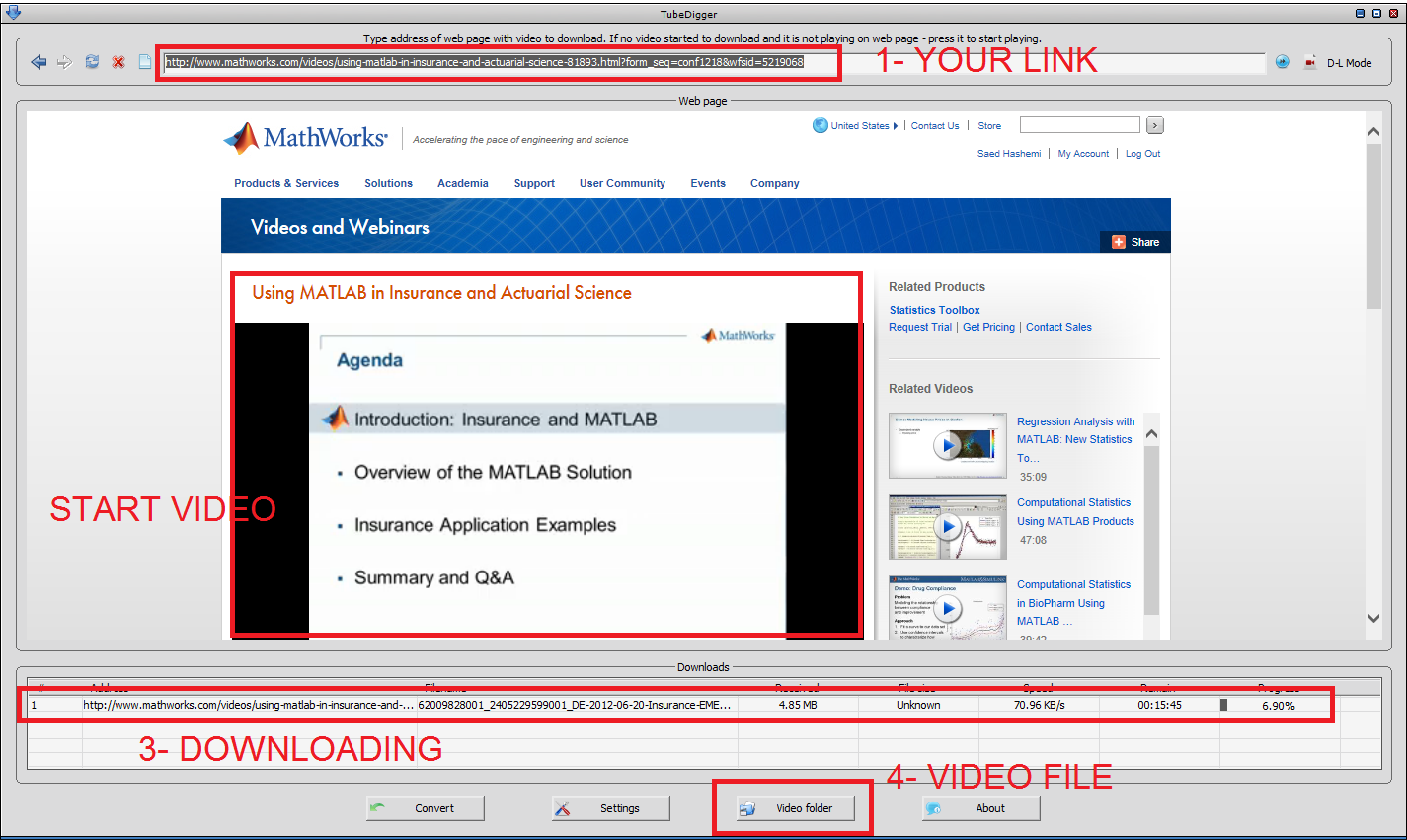
- Download TubeDigger from www.tubedigger.com
- Browse your site in TubeDigger and enjoy ;-)

- How to save videos from MATLAB site
- How to save mathworks.com videos
- How to record video stream ...
- How to save MATLAB Webinar
- How to save videos which play with Brightcove
Solution:
- Download TubeDigger from www.tubedigger.com
- Browse your site in TubeDigger and enjoy ;-)
January 10, 2014
Admin Right to Administrator User in Windows
Problem:
- How fix administrator user has admin right
- How to add admin privilege to administrator user in windows 8
- I have not administrator privilege on my user
- My user is a part of administrator group but has not administrator privilege
- Windows 7, 8 and Windows 8.1 Administrator users doesn't have Admin rights
Solution:
Go to regedit and set this key to zero and enjoy
HKEY_LOCAL_MACHINE\SOFTWARE\Microsoft\Windows\CurrentVersion\Policies\System
Subscribe to:
Posts (Atom)