Showing posts with label Windows. Show all posts

December 29, 2014

IDENTITY_INSERT is set to OFF

Error:
Cannot insert explicit value for identity column in table 'XYZ' when IDENTITY_INSERT is set to OFF.


Solution:
If you work on ASP .Net vNext with MVC 6.0 and EF 7.0 beta, welcome to hell :-))
It's was kidding.

Solution 1 is add [DatabaseGenerated(DatabaseGeneratedOption.None)] annotation to your ID of your Table (class model)

Solution 2 is add below line to OnModelCreating override method of your DbContext
builder.Entity<XYZ>().Property(i => i.Id).GenerateValuesOnAdd(generateValues: false);

November 09, 2014

Problem with webopt for Scripts

Quistions: 
- BundleReference for ASP .Net Forms
- System.Web.Optimization.Scripts.Render for ASP .Net Forms
- Render script without bundlereference
- Microsoft.AspNet.Web.Optimization.WebForms for Render Scripts
- @Scripts.Render for Web Forms
- Render ScriptBundle for Web Forms

Solution:
<%: System.Web.Optimization.Styles.Render("~/bundles/css") %>
<%: System.Web.Optimization.Scripts.Render("~/bundles/js") %>

August 22, 2014

The service cannot be activated

Error:
The service cannot be activated because it does not support ASP.NET compatibility. ASP.NET compatibility is enabled for this application. Turn off ASP.NET compatibility mode in the web.config or add the AspNetCompatibilityRequirements attribute to the service type with RequirementsMode setting as 'Allowed' or 'Required'.

Solution:
Add this line in top your Service class
    [AspNetCompatibilityRequirements(RequirementsMode = AspNetCompatibilityRequirementsMode.Allowed)]

July 14, 2014

Following errors were detected during this operation

Error:
ERROR DETAILS
Following errors were detected during this operation.
* [7/13/2014 10:25:54 AM] System.ArgumentException
- Value does not fall within the expected range.
- Source: System.Deployment
- Stack trace:
at System.Deployment.Internal.Isolation.IStore.LockApplicationPath(UInt32 Flags, IDefinitionAppId ApId, IntPtr& Cookie) 
...

Solution:
1- Uninstall or Remove old version of application
2- Clean this path of any files and folders
PATH: %HOMEPATH%\Local Settings\Apps\2.0\
AKA: C:\Users\XYZ\AppData\Local\Apps\2.0

July 13, 2014

Downloading .config did not succeed

Error:
- Downloading blah/blah/xyz.exe.config did not succeed
- Downloading .config did not succeed

PLATFORM VERSION INFO
Windows : 6.2.9200.0 (Win32NT)
Common Language Runtime : 4.0.30319.34003
System.Deployment.dll : 4.0.30319.33440 built by: FX45W81RTMREL
clr.dll : 4.0.30319.34003 built by: FX45W81RTMGDR
dfdll.dll : 4.0.30319.33440 built by: FX45W81RTMREL
dfshim.dll : 6.3.9600.16384 (winblue_rtm.130821-1623)

SOURCES
Deployment url : http://xyz.com/download/xyz.application
Server : Microsoft-IIS/7.5
X-Powered-By : ASP.NET
Deployment Provider url : http://xyz.com/download/xyz.application
Application url : http://xyz.com/download/Application%20Files/xyz_2_3_1_0/xyz.exe.manifest
Server : Microsoft-IIS/7.5
X-Powered-By : ASP.NET

IDENTITIES
Deployment Identity : xyz.application, Version=2.3.1.0, Culture=neutral, PublicKeyToken=91eae35baf867b49, processorArchitecture=msil
Application Identity : xyz.exe, Version=2.3.1.0, Culture=neutral, PublicKeyToken=91eae35baf867b49, processorArchitecture=msil, type=win32

APPLICATION SUMMARY
* Installable application.

ERROR SUMMARY
Below is a summary of the errors, details of these errors are listed later in the log.
* Activation of http://xyz.com/download/xyz.application resulted in exception. Following failure messages were detected:
+ Downloading http://xyz.com/download/Application Files/xyz_2_3_1_0/xyz.exe.config did not succeed.
+ The remote server returned an error: (404) Not Found.

COMPONENT STORE TRANSACTION FAILURE SUMMARY
No transaction error was detected.

WARNINGS
There were no warnings during this operation.

OPERATION PROGRESS STATUS
* [7/13/2014 11:00:18 AM] : Activation of http://xyz.com/download/xyz.application has started.
* [7/13/2014 11:00:21 AM] : Processing of deployment manifest has successfully completed.
* [7/13/2014 11:00:21 AM] : Installation of the application has started.
* [7/13/2014 11:00:32 AM] : Processing of application manifest has successfully completed.
* [7/13/2014 11:00:49 AM] : Found compatible runtime version 4.0.30319.
* [7/13/2014 11:00:49 AM] : Request of trust and detection of platform is complete.

ERROR DETAILS
Following errors were detected during this operation.
* [7/13/2014 11:01:26 AM] System.Deployment.Application.DeploymentDownloadException (Unknown subtype)
- Downloading http://xyz.com/download/Application Files/xyz_2_3_1_0/xyz.exe.config did not succeed.
- Source: System.Deployment
- Stack trace:
at System.Deployment.Application.SystemNetDownloader.DownloadSingleFile(DownloadQueueItem next)
at System.Deployment.Application.SystemNetDownloader.DownloadAllFiles()
at System.Deployment.Application.FileDownloader.Download(SubscriptionState subState)
at System.Deployment.Application.DownloadManager.DownloadDependencies(SubscriptionState subState, AssemblyManifest deployManifest, AssemblyManifest appManifest, Uri sourceUriBase, String targetDirectory, String group, IDownloadNotification notification, DownloadOptions options)
at System.Deployment.Application.ApplicationActivator.DownloadApplication(SubscriptionState subState, ActivationDescription actDesc, Int64 transactionId, TempDirectory& downloadTemp)
at System.Deployment.Application.ApplicationActivator.InstallApplication(SubscriptionState& subState, ActivationDescription actDesc)
at System.Deployment.Application.ApplicationActivator.PerformDeploymentActivation(Uri activationUri, Boolean isShortcut, String textualSubId, String deploymentProviderUrlFromExtension, BrowserSettings browserSettings, String& errorPageUrl)
at System.Deployment.Application.ApplicationActivator.ActivateDeploymentWorker(Object state)
--- Inner Exception ---
System.Net.WebException
- The remote server returned an error: (404) Not Found.
- Source: System
- Stack trace:
at System.Net.HttpWebRequest.GetResponse()
at System.Deployment.Application.SystemNetDownloader.DownloadSingleFile(DownloadQueueItem next)

COMPONENT STORE TRANSACTION DETAILS
No transaction information is available.

Solution:

This error related to IIS security about .config files. you must go to your visual studio Project > Properties > Publish > Options > and checked Use '.deploy' file extension checkbox ;-)

July 05, 2014

Plesk and forward www to non-www

Problem
- How to change www site to non-www with Plesk
- How to forward www site to non-www with Plesk
- How to forward www.domain.com to domain.com
- Where's Preferred Domain in new Plesk 11.0.9

Solution for Plesk 11.5
Click on Websites & Domains > Hosting Settings > and change Preferred domain to None

Solution for Plesk 11.0.9 and Older
Add DNS Record WWW > CNAME > DOMAIN.COM.

March 24, 2014

Edit Google Document with Microsoft Word

Questions:
- How to edit google document with microsoft word
- How to open a MS Word Document from Google DOCS, edit it, and then save it directly back to Google Document
- How to change a document in Google Drive
- Editing and Working with Microsoft Office on Google Documents

Solution:
Add new REVISION by right click on your document in Google Drive and select Manage revisions... and select Upload new revision and upload your new version of document

February 20, 2014

How to stop browserLink

Questions:
- What's this browserLink in my ASP .Net Project
- What's arterySignalR?
- What's negotiate?requestUrl
- What's arterySignalR/negotiate
- What's arterySignalR/connect?transport=webSockets
- How to stop http://localhost:12661/5d47e5508b77496e916102d7e148ebad/arterySignalR/negotiate?requestUrl=http
- How to stop ws://localhost:12661/5d47e5508b77496e916102d7e148ebad/arterySignalR/connect?transport=webSockets


Solution:
It is a relationship between your Visual Studio and your web browser. This will allow to VS data exchange with browser and vise-verse. for stop this just go to Browser Link Icon in toolbar and unchecked Enable Browser Link like below image.


February 08, 2014

The provider did not return a providermanifest instance

Errors:
- EntityDataSource error ...
- Error in Visual Studio 2013 and EntityDataSource
- EntityDataSource have error "the provider did not return a providermanifest instance"
- How to Fix "The provider did not return a ProviderManifest instance ...

Full Error:
The metadata specified in the connection string could not be loaded. Consider rebuilding the web project to build 
assemblies that may contain metadata. The following error(s) occurred: 
The provider did not return a ProviderManifest instance.


Solution:
Open the EDMX file and change ProviderManifestToken="2012" to ProviderManifestToken="2008"

Other Solutions (not useful for me):
1- I know this is a ridiculous solution but i think that the star (*) is not working in connection string field of Web.config :-( you can change it with project name as a project namespace reference
Before: <add name="TestEntities" connectionString="metadata=res://*/Model1.csdl|res://*/Model1.ssdl blah blah
After: <add name="TestEntities" connectionString="metadata=res://PROJECTNAME/Model1.csdl|res://PROJECTNAME/Model1.ssdl blah blah

2- Go to Run%temp% and empty the temp folder
3- Set integrated security=False in connection string field of Web.config

February 01, 2014

Installer UI Mode Error

Error:
Installer UI Mode Error
Installer User Interface Mode Not Supported

The installer cannot run in this UI mode. To specify the interface mode. Use the -i command-line option, followed by the UI mode identifier. The valid UI modes identifiers are GUI, Console, and Silent.


Solution:
Right Click on EXE file and go to Properties > Compatibility and change the compatibility mode to Windows 7 or Older

Recommendation:
1- Most of time you can find exe files in Temp Directory. For find Windows Temp Directory go to 
-Temp Directory: C:\Users\[USER NAME]\AppData\Local\Temp
-Temp Directory: go to Run (WinKey + R) and type %temp% and press Enter

2- Checked the Run this program as an administrator in Compatibility window.

January 17, 2014

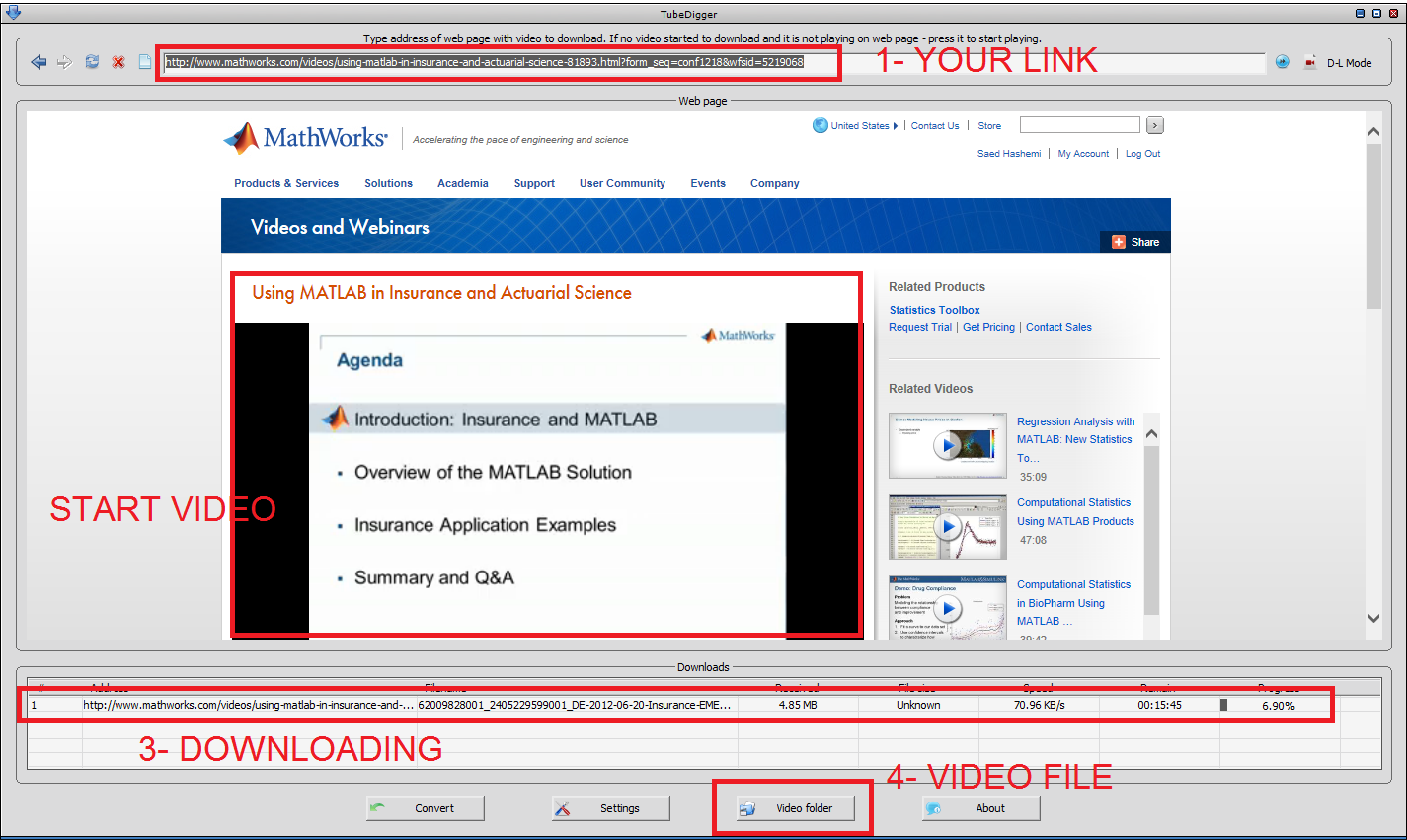
How to save MATLAB Webinar

Problem:
- How to save videos from MATLAB site
- How to save mathworks.com videos
- How to record video stream ...
- How to save MATLAB Webinar
- How to save videos which play with Brightcove

Solution:
- Download TubeDigger from www.tubedigger.com
- Browse your site in TubeDigger and enjoy ;-)


January 10, 2014

Admin Right to Administrator User in Windows

Problem:
- How fix administrator user has admin right
- How to add admin privilege to administrator user in windows 8
- I have not administrator privilege on my user
- My user is a part of administrator group but has not administrator privilege
- Windows 7, 8 and Windows 8.1 Administrator users doesn't have Admin rights

Solution:
Go to regedit and set this key to zero and enjoy
HKEY_LOCAL_MACHINE\SOFTWARE\Microsoft\Windows\CurrentVersion\Policies\System

January 08, 2014

How to Create Windows WiFi Hotspot

Questions
- How to turn my Windows PC into a Wireless Hotspot
- How to create WiFi Hotspot or tethering in Windows 7 or Windows 8 or Windows 8.1
- How to connect my android phone to my Laptop
- How to Share Laptop's Internet Connection with Phone


Solution A
- Go to Control Panel > Network / Network and Sharing Center
- Go to Set up a new connection or network
- Go to Set up a wireless ad hoc (computer-to-computer) network
- Add a Name and Password (and set the security type on WEP) and Checked Save this network and press Next
- [Windows 8.1] Confirm Turn On Internet Connect Sharing
- [Windows 8, 7 or Older] Right Click on available network and select Properties and go to Sharing Tab and checked Allow other network users to connect through this computer's Internet connection


Solution B
- Go to Control Panel > Network / Network and Sharing Center
- Go to left sidebar and select Manage Wireless Networks
- Go to top left and select Add
- Go to Set up a wireless ad hoc (computer-to-computer) network
- Select Next
- Add a Name and Password (leave security type on WEP) and Checked Save this network option


Solution C
- Press Windows Key + R and type ncpa.cpl
- Select current WiFi Adapter and Right Click on it and select Properties
- Go to Sharing Tab and checked Allow other network users to connect through this computer's Internet connection
- [WINDOWS 8.1]: go to left bottom screen and select Command Prompt (Admin)
- [WINDOWS 8, 7 or Older]: Press Windows Key + R
- Change PASSWORD 12345678 and SSID AMASTANEH in below text and type it on black terminal screen
netsh wlan set hostednetwork mode=allow ssid="AMASTANEH" key="12345678"
- you can start and see the ready network with this command
netsh wlan start hostednetwork


Solution D
- Download Virtual Router (Wifi Hot Spot for Windows 8, Windows 7 and 2008 R2) from http://virtualrouter.codeplex.com/
- Install and Run and Enjoy ;-)


Solution E
- Download Connectify from www.connectify.me
- Install and Run and Enjoy ;-)


October 20, 2013

Visual C++ DLL in C#

Questions:
- VC++ DLL in C#
- How to call C++ DLL in C#
- How to call a Visual C++ method in C# by DllImport
- DllImport in C# ... Visual C++ Dll
- How to use DllImport a C++ class

Error:
- Unable to find an entry point named ...

Solution:
Add these lines in VC Project
extern "C"
{
    __declspec(dllexport) int Sum(int a, int b) {return a + b;}
    __declspec(dllexport) int Mul(int a, int b) {return a * b;}
}

Add these lines in C-Sharp Project
public static class DllHelper
{
    [DllImport("XYZ.dll")]
    public static extern int Sum(int a, int b);
    [DllImport("XYZ.dll")]
    public static extern int Mul(int a, int b);
}

September 28, 2013

Copy files to Output in Visual C++

Problem:
- How to Copy a image file in Debug folder?
- How to make a image file output to the Debug or Release directory when compiling
- I want to put a image file under the project root path
- How to configure the project to let it copy the image file to output dir when compiling
- How to automatic copy files to output during application building ...

Solution:
I have a perfect solution. Trust me and come step by step with me.
I do this on Visual Studio 2012, VC++ 11 :-)

1- include the file (or files) to your project.
PS: if you have your the file(s) in project exclude, save project and include it again.

2- Close your Visual Studio and open the project file in any txet editor like notepad or Notepad++

3- Find your file(s) name in project file. It's a None element. Change it like example

BEFORE: 
    <None Include="xyz.ext" />


AFTER:
  <Content Include="xyz.ext">    <CopyToOutputDirectory>PreserveNewest</CopyToOutputDirectory>
  </Content>


August 28, 2013

C# Inline Method

Questions:
- What's the solution for inline method in C#
- C# inline method
- I there a WPF inline method solution
- How to make inline functions on .Net
- ... Inline function in c sharp ...

Solution:
Add this Attribute above your method or functions like below
[MethodImpl(MethodImplOptions.AggressiveInlining)]


July 31, 2013

I hit b, n and m and get "bn", "nm", "m,"

Problem
- I Hit "b" and get "bn"
- I Hit "n" and get "nm"
- I Hit "m" and get "m,"
- Microsoft Wireless Keyboard Problem in hit b, n, m
- Microsoft Wireless Keyboard 3000 problem with "b", "n" and "m" keys

Solution
Don't clean the keyboard with vacuum-cleaner, it's OK just replace your batteries
This is a pathetic sign for low battery i think so 

July 24, 2013

Toolbox Icon For WPF Custom Control

Problem: 
- Displaying a custom Icon on the Toolbox for a Custom Control
- A Toolbox Icon for a WPF Control
- How to add a custom Toolbox icon to a WPF custom control In Visual Studio 2012
- Add a custom control icon to the tool box in VS2012

Solution:
I test more solutions but this solution helps me and it's simplest as i think so.
Just Add a picture file (not just bmp file) to a folder (not a specific folder) with these conditions
- Name: must be a full control name + icon + extension like below example
Structure: FullControlName.icon.ext
Sample Name: Project1.Control1.icon.png
Sample Name: WpfApplication1.Forlder1.CustomControl1.icon.bmp

- Right Click > Properties > Build Action > Embedded Resource (Just Embedded Resource no Resource or another one)


Test:
These icons just appear, when use of your DLL and in Design Time, visual studio just use of default icons.

- Go to ToolBox > RightClick > Choose Items... > WPF Components > Browse... > Add the DLL of your project and enjoy of ICON :-)


April 01, 2013

KMPlayer Access is denied


Problem:
- KMPlayer Error: System Error. Code:5.
- KMPlayer Error: Access is denied
- The KMPlayer have problem with windows 8 ...
- When Windows 8 goes to sleep my kmplayer have problem to access ...


Solution:
You need to have an administrator previllage for your current user on windows 8 ... then follow my steps and continue
- Press Windows Key + Q
- Type command
- Right Click on Command Prompt Tile
- Select Run as administrator from bottom ribbon
- type this command in the black screen and press enter
net user administrator /active:yes

March 26, 2013

Windows 8 snapping not working

Problems:
- My windows 8 can't split screen to two parts ...
- Windows 8 can automatic split to two parts (20% - 80%)
- Windows 8 Snap on desktop not working
- I'm trying Windows 8 and I want to test the new snap feature where you can have two metro apps side-by-side but ...
- How to Force Enable Snap Feature

Solutions:

1- Change you windows resolution to 1344 and upper (like 1360x768 or 1366x768)
2- Create a DWORD key AlwaysEnableLSSnapping with 1 in under location with RegEdit
HKEY_CURRENT_USER \ Software \ Microsoft \ Windows \ CurrentVersion \ ImmersiveShell \ AppPositioner