Showing posts with label Video. Show all posts

January 17, 2014

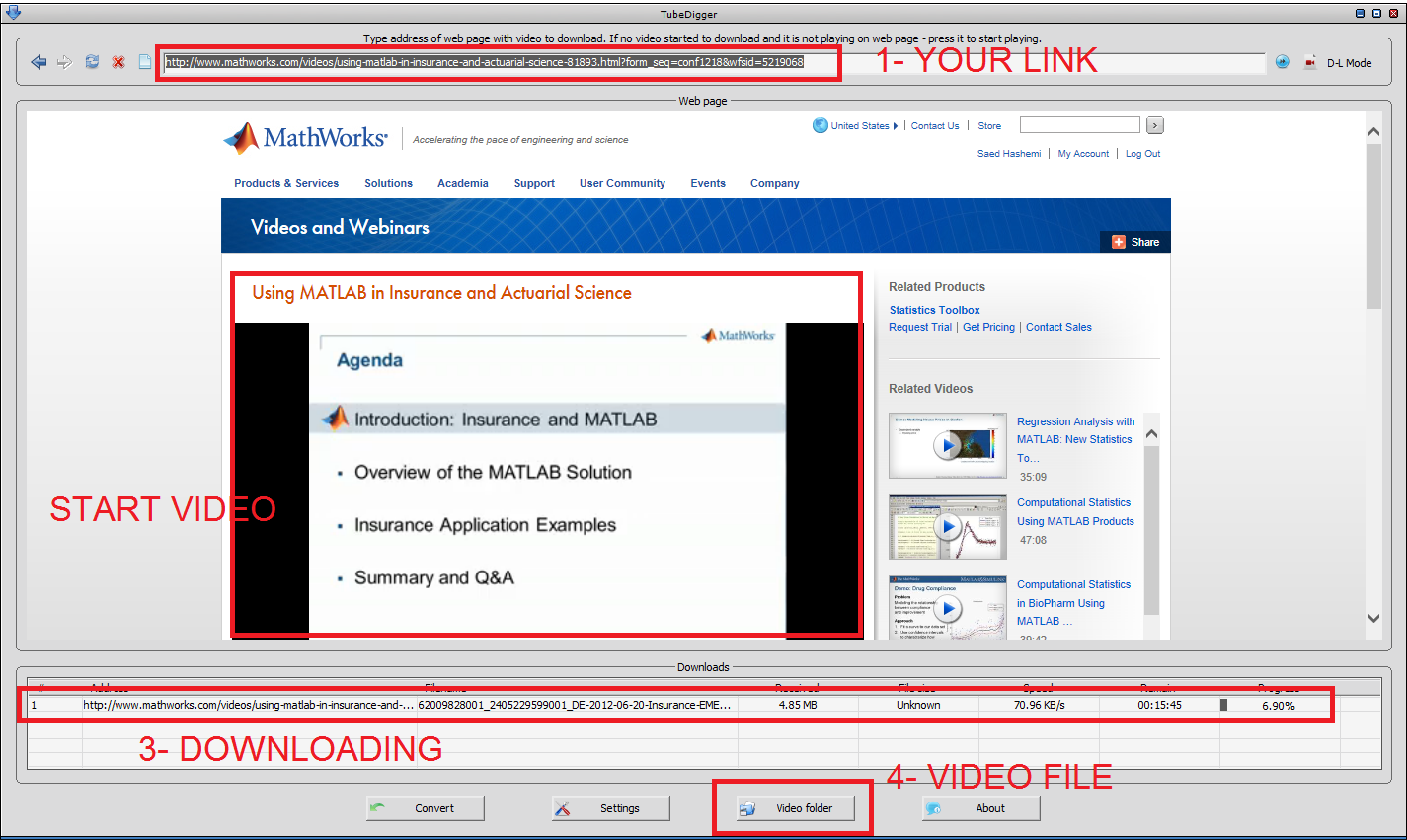
How to save MATLAB Webinar

Problem:
- How to save videos from MATLAB site
- How to save mathworks.com videos
- How to record video stream ...
- How to save MATLAB Webinar
- How to save videos which play with Brightcove

Solution:
- Download TubeDigger from www.tubedigger.com
- Browse your site in TubeDigger and enjoy ;-)


October 16, 2012

Operation could destabilize the runtime


Problem:
- Devexpres has problem ... operation could destabilize the runtime
- have operation could destabilize the runtime with DXWindow ... devexpress
- devexpress problem with Visual Studio 2012


Solution:
There's just one solution, Upgrade to Devexpress v2012.1.6 and next versions ;-)

March 17, 2012

KMPlayer Audio Problem

Problem
- Solve kmplayer mkv audio problem
- How to fix KMPlayer Audio noise
- How to find out the problem of MKV video format audio noise
- When i play the mkv video file, strange noise is mixed with voice ...
- .mkv plays with noise in KMPlayer but in other player it's fine!

Solution
You must to find out the Audio Decoder and change it. Follow me
1- Play the video
2- Press Ctrl + Tab (Advance Playback Info)

3- Read the Audio Decoder Name (in this case it's ACC)
4- Press F2 (Preferences)
5- Goto Filter Control > Decoder Usage > Internal Audio Decoder > Unchecked the Audio Decoder (in this case it's ACC)

6- Close and Close and Open the video again ;-)

March 30, 2009

GOM Player & Unicode SRT

- GOM Player SRT Problem
- GOM Player unicode problem
- GOM Player .srt farsi player problem
- GOM Player .srt persian player problem


Problem:
I have tried playing some movies with srt subtitles last night and the GOM Player has a little problem with some Unicode SRT subtitle e.g Persian/Farsi SRT file.


Solution:
The problem with this comes when we want to use it on windows VISTA. If you have problem with Persian SRT on GOM player then you can use this solution:

1- Change your current default setting for non-unicode application. It's comes from Regional and Language Option.


2- Download and use of the Mirror SRT Application.
The code was developed last night just for solved my own problem. It's not a luxury software. Mirror SRT requires the .NET Framework 3.5 (or above).


Download Link: http://rapidshare.com/files/215528889/MirrorSRT.exe.html

September 30, 2007

Adobe Premiere & Windows 2003

Problem:
adobe premiere 2.0 installer design to run on Windows XP SP2 or higher


Cause:
If you want to install adobe premiere 2.0 on Windows 2003 or Windows Vista then you got error. This problem come from click on setup.exe but the real hole is Adobe Premiere Pro 2.0.msi. This msi package check the windows specification and we can correct it.


Solution:
1- Download Orca for edit msi package
[2.08MB] 1160303066_orca.rar
[7.93MB]
IntelSDK.msi
[Link]
2- Strat Orca and open Adobe Premiere Pro 2.0.msi
3- Goto LunchCondition from left panel and change value of 3th condition row like below
from ((VersionNT> 500) AND (ServicePackLevel> = 2)) OR ((VersionNT64) AND (ServicePackLevel> = 1))
to ( 1 = 1) OR ((VersionNT> 500) AND (ServicePackLevel> = 2)) OR ((VersionNT64) AND (ServicePackLevel> = 1))


If the problem persists, please don't hesitate to contact me ;-)

PS: you can find Orca from here