Showing posts with label Windows 2003. Show all posts
Showing posts with label Windows 2003. Show all posts
August 10, 2012
Lunch Condition
Problems:
- Install .Net Framework in Setup Project ...
- Adding Dot Net Framework to the Setup Project in ...
- Install .NET Framework with Visual Studio .NET ...
- Create setup project that includes .Net Framework 3.5 ...
- How to attach .Net framework 4.0 client profile to my setup project?
- Setup project wants to install .NET 4
- How to include .NET framework redistributable in Visual Studio setup ....
- Setup project: where .net framework 4.0 is
- Add Prerequisites of .NET Framework in Visual Studio Setup Project ...
- .Net 2.0 or 3.5 Setup Project Requires .Net Framework version 4.0
Solutions:
Windows Installer 3.1 (With Local Prerequisite)
Name: Windows Installer 3.1
Condition: VersionMsi >= "3.1"
InstallUrl: WindowsInstaller3_1\WindowsInstaller-KB893803-v2-x86.exe
Message: Windows Installer 3.1 is required to run this setup
Windows Installer 3.1
Name: Windows Installer 3.1
Condition: VersionMsi >= "3.1"
InstallUrl: go.microsoft.com/fwlink/?LinkId=42467
Message: Windows Installer 3.1 is required to run this setup
Windows Installer 4.5 (With Local Prerequisite)
Name: Windows Installer 4.5
Condition: VersionMsi >= "4.05"
InstallUrl: WindowsInstaller3_1\WindowsInstaller-KB893803-v2-x86.exe
Message: Windows Installer 4.5 is required to run this setup
Windows Installer 4.5
Name: Windows Installer 4.5
Condition: VersionMsi >= "4.05"
InstallUrl: http://go.microsoft.com/fwlink/?LinkId=120486
Message: Windows Installer 4.5 is required to run this setup
.NET Framework (With Local Prerequisite)
Name: .NET Framework
InstallUrl: DotNetFX40Client\dotNetFx40_Client_x86_x64.exe
Version: .NET Framework 4 Client Profile
Message: [VSDNETMSG]
PS: '.NET Framework' condition is a automatic added condition after add a .Net Project to Setup Project


April 13, 2011
Run JSP pages on windows
Problem:
- How to run a web server for jsp pages on windows
- How to make a windows to a web host for JSP pages.
Solution:
1- JVM: You must have a JVM. You can check default folder C:\Program Files\Java\ for find a jdk1.5.0_06 or jdk1.6.0_10 or any version of SUN’s JDK
2- Tomcat: You need to have Tomcat and you can check the default folder C:\Program Files\Apache Software Foundation\ for find a Tomcat 5.5 or Tomcat 7.0. Choose exe instead of zip file from core section in Tomcat download page. (I choose 32-bit/64-bit Windows Service Installer from core section and select FULL installation option in install process). After install you can see the something in http://localhost:8080/ ;-)
3- RUN: Goto C:\Program Files\Apache Software Foundation\Tomcat 7.0\webapps and make a folder and put your JSP files here ;-)
References:
JVM: http://java.sun.com/javase/downloads/index.jsp
TOMCAT: http://tomcat.apache.org/download-70.cgi
- How to run a web server for jsp pages on windows
- How to make a windows to a web host for JSP pages.
Solution:
1- JVM: You must have a JVM. You can check default folder C:\Program Files\Java\ for find a jdk1.5.0_06 or jdk1.6.0_10 or any version of SUN’s JDK
2- Tomcat: You need to have Tomcat and you can check the default folder C:\Program Files\Apache Software Foundation\ for find a Tomcat 5.5 or Tomcat 7.0. Choose exe instead of zip file from core section in Tomcat download page. (I choose 32-bit/64-bit Windows Service Installer from core section and select FULL installation option in install process). After install you can see the something in http://localhost:8080/ ;-)
3- RUN: Goto C:\Program Files\Apache Software Foundation\Tomcat 7.0\webapps and make a folder and put your JSP files here ;-)
References:
JVM: http://java.sun.com/javase/downloads/index.jsp
TOMCAT: http://tomcat.apache.org/download-70.cgi
April 08, 2011
Authorization: Cannot verify access to path
Error:
Authorization Cannot verify access to path
 Error Description:
Solution:
1- Open IIS 7.0
2- Select Default Web Site and Right-Click on it
3- Select Add Application... or Add Virtual Directory...
4- Select Contact as..
5- Change Path credentials: from Application user (pass-through authentication) to Specific user:
6- Add a Admin User with password like COMPUETRNAME\Administrator User

Authorization Cannot verify access to path

The server is configured to use pass-through authentication with a built-in account to access the specified physical path. However, IIS Manager cannot verify whether the built-in account has access. Make sure that the application pool identity has Read access to the physical path. If this server is joined to a domain, and the application pool identity is NetworkService or LocalSystem, verify that \$ has Read access to the physical path. Then test these settings again.
1- Open IIS 7.0
2- Select Default Web Site and Right-Click on it
3- Select Add Application... or Add Virtual Directory...
4- Select Contact as..
5- Change Path credentials: from Application user (pass-through authentication) to Specific user:
6- Add a Admin User with password like COMPUETRNAME\Administrator User

March 16, 2011
Add OCX to C#
Questions
- Adding an OCX to a .Net Project
- How to add a OCX in C# Project?
- How to add a OCX in Windows Form Application?
- Adding a VB6 OCX in C# projects
Solution
1- Create a new Windows Form Application
2- goto Menu > Tools > Choose Toolbox Items
3- goto to COM Components tab and find Browse button
4- Add the OCX (you could install the OCX with regsvr32 command)
5- Drag it from toolbox and drop on form and enjoy
- Adding an OCX to a .Net Project
- How to add a OCX in C# Project?
- How to add a OCX in Windows Form Application?
- Adding a VB6 OCX in C# projects
Solution
1- Create a new Windows Form Application
2- goto Menu > Tools > Choose Toolbox Items
3- goto to COM Components tab and find Browse button
4- Add the OCX (you could install the OCX with regsvr32 command)
5- Drag it from toolbox and drop on form and enjoy
September 30, 2007
Adobe Premiere & Windows 2003
Problem:
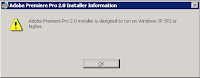
adobe premiere 2.0 installer design to run on Windows XP SP2 or higher
Cause:
If you want to install adobe premiere 2.0 on Windows 2003 or Windows Vista then you got error. This problem come from click on setup.exe but the real hole is Adobe Premiere Pro 2.0.msi. This msi package check the windows specification and we can correct it.
Solution:
1- Download Orca for edit msi package
[2.08MB] 1160303066_orca.rar
[7.93MB] IntelSDK.msi
[Link]
2- Strat Orca and open Adobe Premiere Pro 2.0.msi
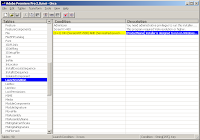
3- Goto LunchCondition from left panel and change value of 3th condition row like below
from ((VersionNT> 500) AND (ServicePackLevel> = 2)) OR ((VersionNT64) AND (ServicePackLevel> = 1))
to ( 1 = 1) OR ((VersionNT> 500) AND (ServicePackLevel> = 2)) OR ((VersionNT64) AND (ServicePackLevel> = 1))
If the problem persists, please don't hesitate to contact me ;-)
PS: you can find Orca from here
adobe premiere 2.0 installer design to run on Windows XP SP2 or higher

Cause:
If you want to install adobe premiere 2.0 on Windows 2003 or Windows Vista then you got error. This problem come from click on setup.exe but the real hole is Adobe Premiere Pro 2.0.msi. This msi package check the windows specification and we can correct it.

Solution:
1- Download Orca for edit msi package
[2.08MB] 1160303066_orca.rar
[7.93MB] IntelSDK.msi
[Link]
2- Strat Orca and open Adobe Premiere Pro 2.0.msi
3- Goto LunchCondition from left panel and change value of 3th condition row like below
from ((VersionNT> 500) AND (ServicePackLevel> = 2)) OR ((VersionNT64) AND (ServicePackLevel> = 1))
to ( 1 = 1) OR ((VersionNT> 500) AND (ServicePackLevel> = 2)) OR ((VersionNT64) AND (ServicePackLevel> = 1))
If the problem persists, please don't hesitate to contact me ;-)
PS: you can find Orca from here
March 24, 2007
Dell Driver Problem On Windows 2003
Do you have problem for migration from Windows XP to Windows 2003 on Dell notebook like me .. ;-)
My friend purchased a Dell XPS M1710 (and M1210 for his robot team) and i replaced Windows XP with Windows Server 2003.
The problem was started with modem and sound card ...
After my migration, i had two icons with an exclamation mark for PCI Device (modem) and Microsoft UAA Bus Driver for High Definition Audio (audio)
Modem Specification:
Title: Communications: Conexant D110,HDA,MDC,v.92,modem DRVR
OEM name : Conexant D110,HDA,MDC,v.92,modem
OEM Version: Drv7.38.0xp
Computers : MXG061
OS : Windows XP
Created : Friday, November 10, 2006
Sound Card Specification:
Title: Audio: SIGMATEL STAC 92XX C-Major HD Audio DRVR
OEM name : SIGMATEL STAC 92XX C-Major HD Audio
OEM Version: 5.10.0.4995
Computers : MXG061
OS : Windows XP
Created : Friday, November 10, 2006
Solving Solution:
You must download and install (just 545KB) package from Microsoft [link] for this hell problem.
It come for
- Microsoft Windows Server 2003, 32-Bit Editions [link]
- Microsoft Windows Server 2003, 64-Bit Editions [link]
- Microsoft Windows XP Professional x64 Editions [link]
after install it your drive install easily ...
but if you have problem again you can
- Enable Windows Audio service from Control Panel>Administrative Tools>Services>Windows Audio>Automatic/Startup
- Visit Dell Download and Driver for SIGMATEL STAC 92XX C-Major HD Audio [link]
- Visit Dell Download and Driver for Conexant D110,HDA,MDC,v.92,modem [link]
My friend purchased a Dell XPS M1710 (and M1210 for his robot team) and i replaced Windows XP with Windows Server 2003.
The problem was started with modem and sound card ...
After my migration, i had two icons with an exclamation mark for PCI Device (modem) and Microsoft UAA Bus Driver for High Definition Audio (audio)
Modem Specification:
Title: Communications: Conexant D110,HDA,MDC,v.92,modem DRVR
OEM name : Conexant D110,HDA,MDC,v.92,modem
OEM Version: Drv7.38.0xp
Computers : MXG061
OS : Windows XP
Created : Friday, November 10, 2006
Sound Card Specification:
Title: Audio: SIGMATEL STAC 92XX C-Major HD Audio DRVR
OEM name : SIGMATEL STAC 92XX C-Major HD Audio
OEM Version: 5.10.0.4995
Computers : MXG061
OS : Windows XP
Created : Friday, November 10, 2006
Solving Solution:
You must download and install (just 545KB) package from Microsoft [link] for this hell problem.
It come for
- Microsoft Windows Server 2003, 32-Bit Editions [link]
- Microsoft Windows Server 2003, 64-Bit Editions [link]
- Microsoft Windows XP Professional x64 Editions [link]
after install it your drive install easily ...
but if you have problem again you can
- Enable Windows Audio service from Control Panel>Administrative Tools>Services>Windows Audio>Automatic/Startup
- Visit Dell Download and Driver for SIGMATEL STAC 92XX C-Major HD Audio [link]
- Visit Dell Download and Driver for Conexant D110,HDA,MDC,v.92,modem [link]
Subscribe to:
Posts (Atom)