Showing posts with label Adobe. Show all posts
Showing posts with label Adobe. Show all posts
March 05, 2013
Adobe Photoshop CS6 blink/glitch
Errors:
- Why Photoshop CS6 turn on/off ...
- Why Photoshop CS6 blink on windows 8 ...
- I can't work with Photoshop CS6 on Windows 8 ... has glitch link old TV ...
Solution:
- Edit > Preferences > Performances > Advanced Settings ... > Change to Basic
- Restart the Photoshop
It's done but this is not a solution and it's help to avoid of problem :-(
References:
[1] http://forums.adobe.com/message/4940042


June 11, 2011
Make invisible layer in Flash CS5
Hide layer (with click on eye icon) for invisible in design time and then right-click on layer and checked the Guide item for invisible in run-time.
May 26, 2011
History of Adobe Media Player
Problem:
- How do i delete all my personal videos in Adobe Media player?
- Where is file history in Adobe Media Player?
- How to clear history of Adobe Flash Player?
Solution:
It's so simple. Go to below folder and delete or rename it ... ;-)
C:\Users\{YOUR USER}\AppData\Roaming\Adobe\Adobe Media Player
like
C:\Users\Administrator\AppData\Roaming\Adobe\Adobe Media Player
- How do i delete all my personal videos in Adobe Media player?
- Where is file history in Adobe Media Player?
- How to clear history of Adobe Flash Player?
Solution:
It's so simple. Go to below folder and delete or rename it ... ;-)
C:\Users\{YOUR USER}\AppData\Roaming\Adobe\Adobe Media Player
like
C:\Users\Administrator\AppData\Roaming\Adobe\Adobe Media Player
April 24, 2011
ActionScript3.0 problem with TLF text
Error:
- All method which are related to string not at working after first object convert from Classic Text to TLF Text
- dispatchEvent not working with TLF text
- all movies not load after convert Text to TLF
Solution:
The solution is really simple and worked
- Sleect FLA file from Project (or load it)
- Select File > Publish Settings... from top menu of press Ctrl + Shift + F12
- Select Flash Tab

- Press on Settings... botton in front of Script section
- Select Library path Tab from new opened dialoge
- Find Default Linkage combo box
- Change the value to Merge into code

- Press OK
- Press Publish and OK
- Enjoy :D
- All method which are related to string not at working after first object convert from Classic Text to TLF Text
- dispatchEvent not working with TLF text
- all movies not load after convert Text to TLF
Solution:
The solution is really simple and worked
- Sleect FLA file from Project (or load it)
- Select File > Publish Settings... from top menu of press Ctrl + Shift + F12
- Select Flash Tab

- Press on Settings... botton in front of Script section
- Select Library path Tab from new opened dialoge
- Find Default Linkage combo box
- Change the value to Merge into code

- Press OK
- Press Publish and OK
- Enjoy :D
September 30, 2007
Adobe Premiere & Windows 2003
Problem:
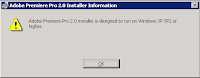
adobe premiere 2.0 installer design to run on Windows XP SP2 or higher
Cause:
If you want to install adobe premiere 2.0 on Windows 2003 or Windows Vista then you got error. This problem come from click on setup.exe but the real hole is Adobe Premiere Pro 2.0.msi. This msi package check the windows specification and we can correct it.
Solution:
1- Download Orca for edit msi package
[2.08MB] 1160303066_orca.rar
[7.93MB] IntelSDK.msi
[Link]
2- Strat Orca and open Adobe Premiere Pro 2.0.msi
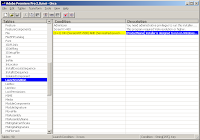
3- Goto LunchCondition from left panel and change value of 3th condition row like below
from ((VersionNT> 500) AND (ServicePackLevel> = 2)) OR ((VersionNT64) AND (ServicePackLevel> = 1))
to ( 1 = 1) OR ((VersionNT> 500) AND (ServicePackLevel> = 2)) OR ((VersionNT64) AND (ServicePackLevel> = 1))
If the problem persists, please don't hesitate to contact me ;-)
PS: you can find Orca from here
adobe premiere 2.0 installer design to run on Windows XP SP2 or higher

Cause:
If you want to install adobe premiere 2.0 on Windows 2003 or Windows Vista then you got error. This problem come from click on setup.exe but the real hole is Adobe Premiere Pro 2.0.msi. This msi package check the windows specification and we can correct it.

Solution:
1- Download Orca for edit msi package
[2.08MB] 1160303066_orca.rar
[7.93MB] IntelSDK.msi
[Link]
2- Strat Orca and open Adobe Premiere Pro 2.0.msi
3- Goto LunchCondition from left panel and change value of 3th condition row like below
from ((VersionNT> 500) AND (ServicePackLevel> = 2)) OR ((VersionNT64) AND (ServicePackLevel> = 1))
to ( 1 = 1) OR ((VersionNT> 500) AND (ServicePackLevel> = 2)) OR ((VersionNT64) AND (ServicePackLevel> = 1))
If the problem persists, please don't hesitate to contact me ;-)
PS: you can find Orca from here
Subscribe to:
Posts (Atom)