March 08, 2014

OpenCV on Visual Studio 2013

Questions:
- How to start OpenCV with VC++
- How to create a new opencv project in VS2013
- How to configure Visual Studio 2013 for OpenCV
- Why i can't config windows and visual studio for start with OpenCV

Configure Windows:
Follow these steps
1- My Computer > Properties > Advanced System Settings > Environment Variables > New and add new system variable
Name: OPENCV_DIR
Value: C:\opencv\build\ (or other path that you like)

2- My Computer > Properties > Advanced System Settings > Environment Variables... > System variables > select Path and press Edit button
and add ;%OPENCV_DIR%\x86\vc12\bin

PS: for Visual Studio 2013 add ;%OPENCV_DIR%\x86\vc12\bin
PS: for Visual Studio 2012 add ;%OPENCV_DIR%\x86\vc11\bin


Configure Visual Studio Project:
1- Add new Visual C++ Project from File > Project... > Visual C++ > Win32 Console Application and select a name for your project and press OK and finished

2- Go to Solution Explorer > select Project and right click > Properties > Configuration > and select All Configurations

3- In left tree menu select Configuration Properties > C/C++ > General > Additional Include Directories > Add $(OPENCV_DIR)\Include in right section
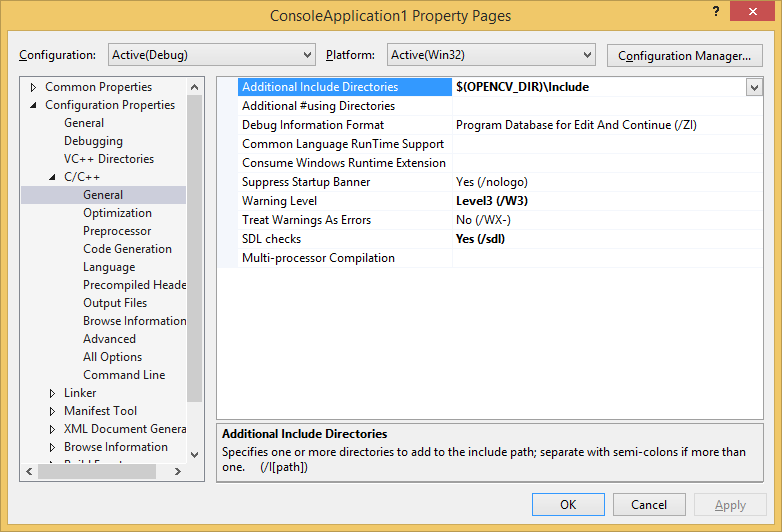

3- In left tree menu select Configuration Properties > C/C++ > Linker > General > Additional Library Directories > Add $(OPENCV_DIR)\x86\vc12\lib in right section

PS: Please choose right item based on your visual studio
$(OPENCV_DIR)\x86\vc12\lib or
$(OPENCV_DIR)\x86\vc12\lib 
you can find version of visual studio in Configuration Properties > General > Platform Toolset

3- In left tree menu select Configuration Properties > C/C++ > Linker > Input > Additional Dependencies > select Edit and add below lib files

opencv_calib3d248d.lib
opencv_contrib248d.lib
opencv_core248d.lib
opencv_features2d248d.lib
opencv_flann248d.lib
opencv_gpu248d.lib
opencv_haartraining_engined.lib
opencv_highgui248d.lib
opencv_imgproc248d.lib
opencv_legacy248d.lib
opencv_ml248d.lib
opencv_nonfree248d.lib
opencv_objdetect248d.lib
opencv_photo248d.lib
opencv_stitching248d.lib
opencv_superres248d.lib
opencv_ts248d.lib
opencv_video248d.lib
opencv_videostab248d.lib

PS: Above file names are consist of opencv_ + name of library + version of OpenCV and d for Debug library edition

PS: Before add these items open 
C:\opencv\build\x86\vc10\lib or
C:\opencv\build\x86\vc11\lib or
C:\opencv\build\x86\vc12\lib 
based on your Visual Studio and select right names

PS: You can change Configuration in top left of Property Pages and select Release and add with 'd' Library to your release project

opencv_calib3d248.lib
opencv_contrib248.lib
opencv_core248.lib
opencv_features2d248.lib
opencv_flann248.lib
opencv_gpu248.lib
opencv_haartraining_engined.lib
opencv_highgui248.lib
opencv_imgproc248.lib
opencv_legacy248.lib
opencv_ml248.lib
opencv_nonfree248.lib
opencv_objdetect248.lib
opencv_photo248.lib
opencv_stitching248.lib
opencv_superres248.lib
opencv_ts248.lib
opencv_video248.lib
opencv_videostab248.lib

PS: all these libraries (lib files) are not required and you can choose your required library

Explanation:
- Microsoft Windows 8.1
- Visual Studio 2013 (v120)

February 20, 2014

How to stop browserLink

Questions:
- What's this browserLink in my ASP .Net Project
- What's arterySignalR?
- What's negotiate?requestUrl
- What's arterySignalR/negotiate
- What's arterySignalR/connect?transport=webSockets
- How to stop http://localhost:12661/5d47e5508b77496e916102d7e148ebad/arterySignalR/negotiate?requestUrl=http
- How to stop ws://localhost:12661/5d47e5508b77496e916102d7e148ebad/arterySignalR/connect?transport=webSockets


Solution:
It is a relationship between your Visual Studio and your web browser. This will allow to VS data exchange with browser and vise-verse. for stop this just go to Browser Link Icon in toolbar and unchecked Enable Browser Link like below image.


February 08, 2014

The provider did not return a providermanifest instance

Errors:
- EntityDataSource error ...
- Error in Visual Studio 2013 and EntityDataSource
- EntityDataSource have error "the provider did not return a providermanifest instance"
- How to Fix "The provider did not return a ProviderManifest instance ...

Full Error:
The metadata specified in the connection string could not be loaded. Consider rebuilding the web project to build 
assemblies that may contain metadata. The following error(s) occurred: 
The provider did not return a ProviderManifest instance.


Solution:
Open the EDMX file and change ProviderManifestToken="2012" to ProviderManifestToken="2008"

Other Solutions (not useful for me):
1- I know this is a ridiculous solution but i think that the star (*) is not working in connection string field of Web.config :-( you can change it with project name as a project namespace reference
Before: <add name="TestEntities" connectionString="metadata=res://*/Model1.csdl|res://*/Model1.ssdl blah blah
After: <add name="TestEntities" connectionString="metadata=res://PROJECTNAME/Model1.csdl|res://PROJECTNAME/Model1.ssdl blah blah

2- Go to Run > %temp% and empty the temp folder
3- Set integrated security=False in connection string field of Web.config

February 04, 2014

SugarCRM Installation Problem

Errors: 
- Cant get past License Acceptance Page ...
- Next is not working in License Acceptance Page
- yahoo is not defined - license acceptance failed
- Can't get past the License acceptance screen
- Problem with installation on step License Acceptance
- Can't get passed License Acceptance
- Install stuck at License Acceptance
- Error occurs when clicking "next" on the license-agreement screen

Solution:
- Go to .../include/javascript/yui/build/container
- Replace container.js to container-min.js (remove min file and copy original file with a new name)
The problem solve :-)

My Road-map:
Yes, it's simple like as a charm. if you want to know about how to trick to find out this solution follow these steps
- Open page in Chrome and use of Inspect Element > Source
- Find out where's the problem
- Find out what's file name
- After that i think that it's could be solve after change it with original source (not minified) or replace with a new one.
Yes, after change the min file with uncompressed file the problem goes ;-)